

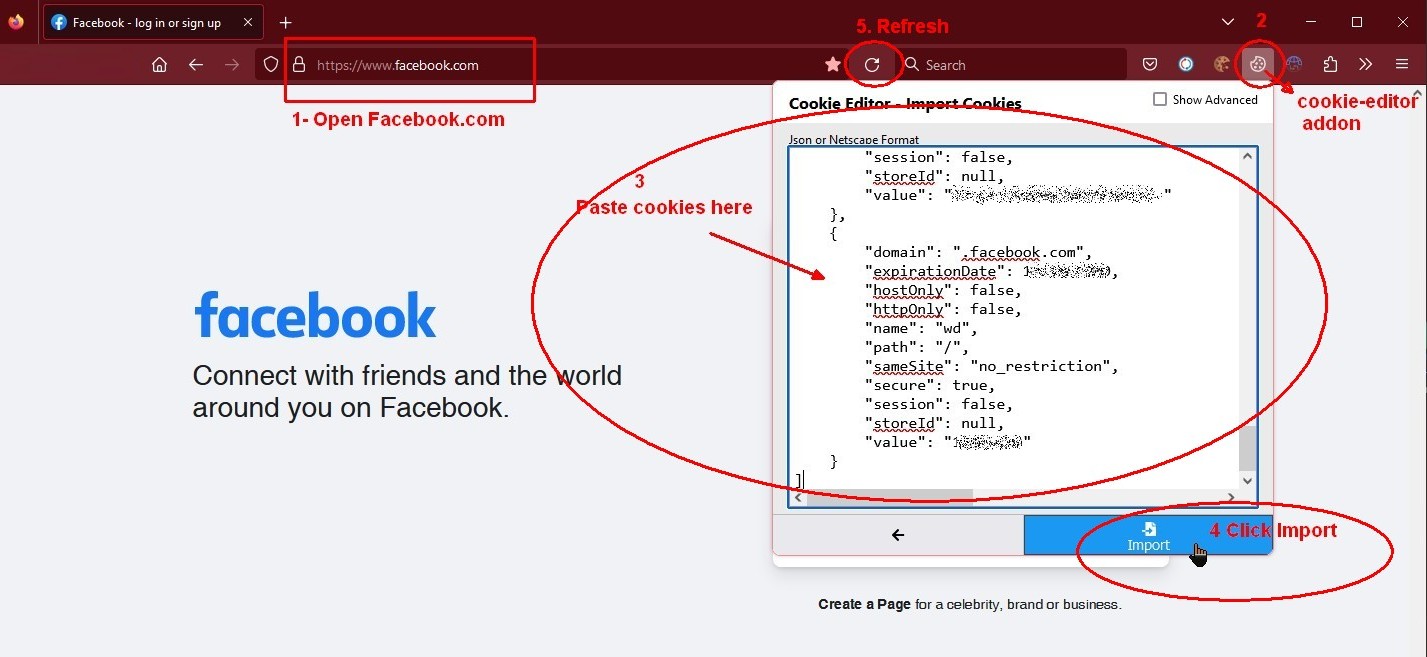
1- In a new Chrome or Firefox browser profile, separate from your main, install the Cookie-Editor extension and open facebook.com.
2- While you still are on the Facebook tab, click the icon of the Cookie-Editor icon to open the extension’s pop-up window.
3- Go to the “Import” section and paste the content of the cookies file (plain text) into the extension window.
4- Click the “Import” button. Make sure you are still on the Facebook tab all the time.
5- Refresh the tab or press F5.
Now you should be logged in. If you imported them correcly and, after refreshing, you are taken back to the Facebook login page asking for the email/username and password, the session in the cookies has already been closed and the cookies are no longer valid.
Either way, whether the cookies are valid or not, if you log in by entering the account’s username/email and password, you will create new cookies and open a new session, which you will have to warm up again from scratch.


